A friendly front end for serious plasma physics.
For research and education · Open to everyone · No coding required
JC-PIC is a 1D3V Particle-In-Cell / Monte Carlo Collision code for low-pressure, weakly ionized plasmas — as encountered in plasma processing and gaseous electronics. A built-in Swarm mode also computes electron transport coefficients, by Monte-Carlo simulation.
Set up a case, click Run, and watch the plasma evolve through a dozen live viewers — no programming required. A validated Fortran engine behind a graphical interface, distributed free of charge for teaching and research.
Free · Windows desktop · No account, no telemetry, no internet required · Bundled with a library of documented cases
Everything on this site — the bundled cases, the interface, the way the code was written — follows from these three objectives.
Revisit the physics of low-temperature plasmas through a curated library of PIC-MCC simulations. Reproduce the key conclusions of recent publications in one dimension — each presented as a documented, ready-to-run, and fully interactive case. Every case can be read online before installing anything.
Provide a robust, user-friendly PIC-MCC code usable by experimentalists, students, and teachers, with no programming required. Users can explore complex dynamics instantly and contribute their own setups to a growing, collaborative resource.
Demonstrate how a high-performance research code and its complete graphical interface can be developed with the assistance of Anthropic's Claude AI. This synergy between expert scientific direction and AI made a tool of this scope a reality. See the account below.
The background: PIC-MCC solvers have been used extensively over the last two decades to study low-temperature plasmas. Thanks to these kinetic models, many complex phenomena central to practical plasma applications — electron power absorption in RF discharges, instabilities in the magnetized plasmas of electric thrusters and magnetrons, the role of secondary electron emission, striations in plasma columns — are now far better understood. JC-PIC distils this body of work into a tool anyone can run.
One spatial dimension, three velocity components, electrostatic fields with an external magnetic field, and Monte Carlo collisions with the neutral gas — covering a broad range of low-temperature discharge configurations. Each configuration ships as a documented, ready-to-run bundled case: pick one close to your problem, reproduce it, then vary the parameters from there.
The fundamentals as ready-to-run experiments: sheaths and the plasma potential, Langmuir and ion-acoustic waves — with the built-in (k, ω) Fourier analysis to see their dispersion — plasma expansion into vacuum, ambipolar collisional diffusion, wave breaking and Landau damping.
Single- and multi-frequency capacitively coupled plasmas driven by prescribed voltage waveforms, including the dual-frequency electrical asymmetry effect and electron power-absorption analysis. Influence of pressure, frequency and magnetic field.
Direct-current glow discharges with secondary emission, with or without a superimposed RF component, plus pulsed plasma-immersion ion implantation with fast sheath expansion.
The axial structure of a long discharge in periodic mode: ionization waves (striations) in DC and RF columns, radial non-equilibrium, and the Hall effect.
A weak external magnetic field, and Hall-thruster-style azimuthal E×B configurations exhibiting the electron-cyclotron drift instability. Hall effect in a magnetized plasma column.
Space-charge-limited current (Child–Langmuir), virtual-cathode oscillations, thermionic emission and self-sustained thermionic discharge regimes.
The classic two-stream, Buneman and beam–plasma instabilities in their cleanest periodic form.
A second, autonomous Monte-Carlo engine computes the electron transport and rate coefficients — drift velocity, mobility, diffusion, ionization/excitation rates, mean energy, EEPF and its anisotropy — as functions of the reduced field E/N, with statistical error bars.
Secondary electron emission, cathode emission (cold, beam, thermionic), full electron & ion Monte Carlo collisions (elastic, excitation, ionization, charge exchange) — and, optionally, electron–electron Coulomb collisions — are all built in, using cross-section tables loaded at startup.
Most cases ship with a precomputed snapshot, so they can be visualized the moment they load — and the library is collaborative: a case you build can later be folded into the shared library.
Everything is organized so you interact with the plasma the way you would with a piece of laboratory hardware.
Dozens of physical and numerical parameters — gas, pressure, voltages, frequency, fields, diagnostics — organized into intuitive categories instead of a cryptic input file.
Walk a tree of preconfigured cases, read its Markdown description, and load it into your own working directory in one click. The recommended entry point — and the same tree is browsable online.
Density profiles, position–time diagrams with full (k, ω) Fourier analysis, phase space, EEPF (1D & 2D), ion/electron energy distributions, current histories and spectra, per-process collision frequencies, the Schulze power decomposition, and more.
Results are written to disk continuously and survive restarts. Pause, stop, and resume a run at any later time — even on another machine pointing to the same folder.
The simulation core is modern Fortran parallelized with OpenMP, automatically using every core. A typical capacitive-RF case runs in a few hours on an ordinary desktop.
No cloud, no telemetry, no account. Plain-text namelists, Markdown descriptions, JSON metadata and documented binary snapshots — your data stays fully accessible.
JC-PIC's results are checked in three independent ways: against an independent code, against a community benchmark, and against the published literature.
Results are cross-checked against J-PIC, the earlier particle-in-cell code of the author, J.-P. Boeuf, developed independently and used in several published studies.
JC-PIC reproduces the four-case capacitively-coupled RF benchmark of Turner et al. (Phys. Plasmas, 2013) — the standard verification test for low-temperature PIC codes.
Many of the bundled cases reproduce published PIC-MCC results — emissive cathodes, DC and RF discharges, striations, magnetized E×B plasmas, beam instabilities — with the original papers cited in each case description: browse the case library. Others check the code against a classical analytical solution — the Bohm criterion, the Child–Langmuir law, Landau damping, the Chodura sheath — and each case description says which of the two it is.
The Swarm mode has its own reference chain: its transport and rate coefficients are checked against BOLSIG+ on the same cross sections and against the Monte-Carlo swarm literature (Hagelaar, Phys. Plasmas 32, 043501, 2025).
Phase-space and profile animations exported from JC-PIC's diagnostic viewers — each from a bundled case that can be loaded and reproduced.
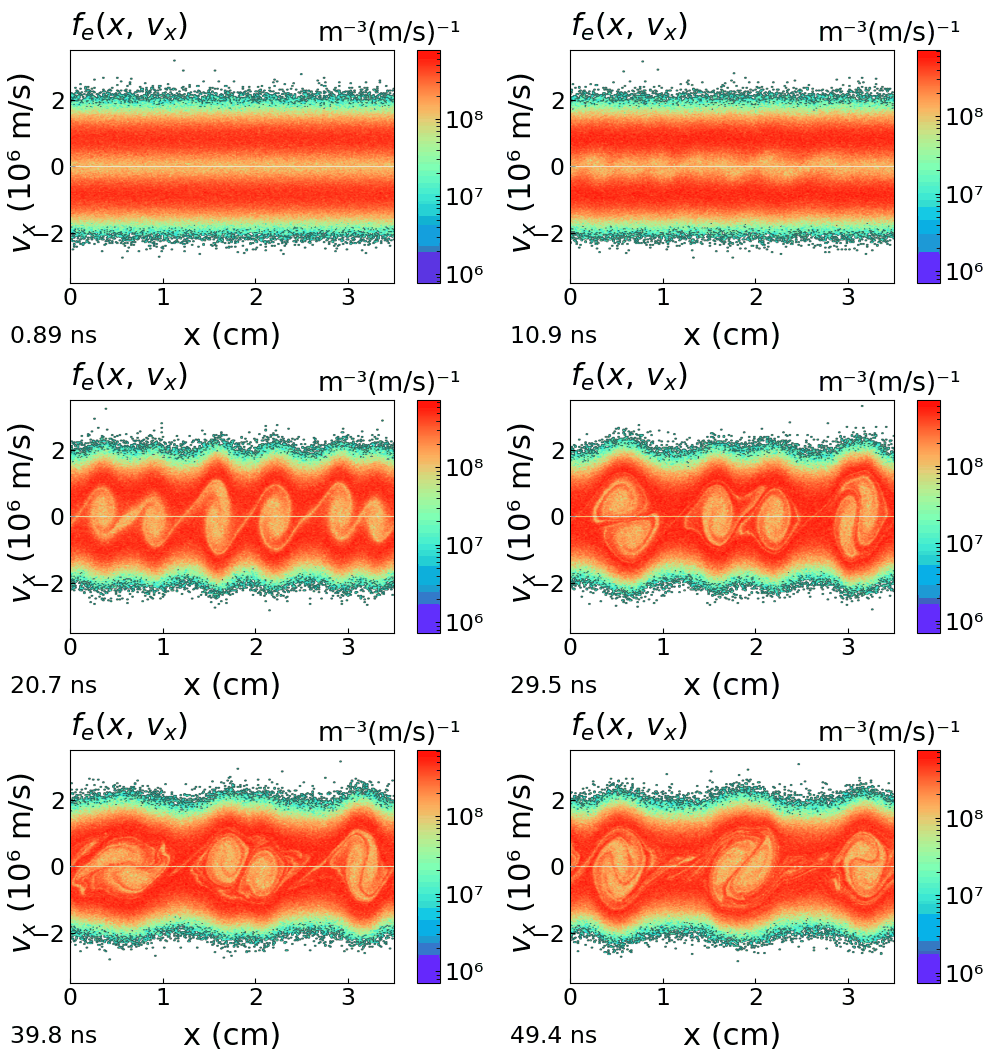
Counter-streaming beams wind phase space into cat's-eye vortices.
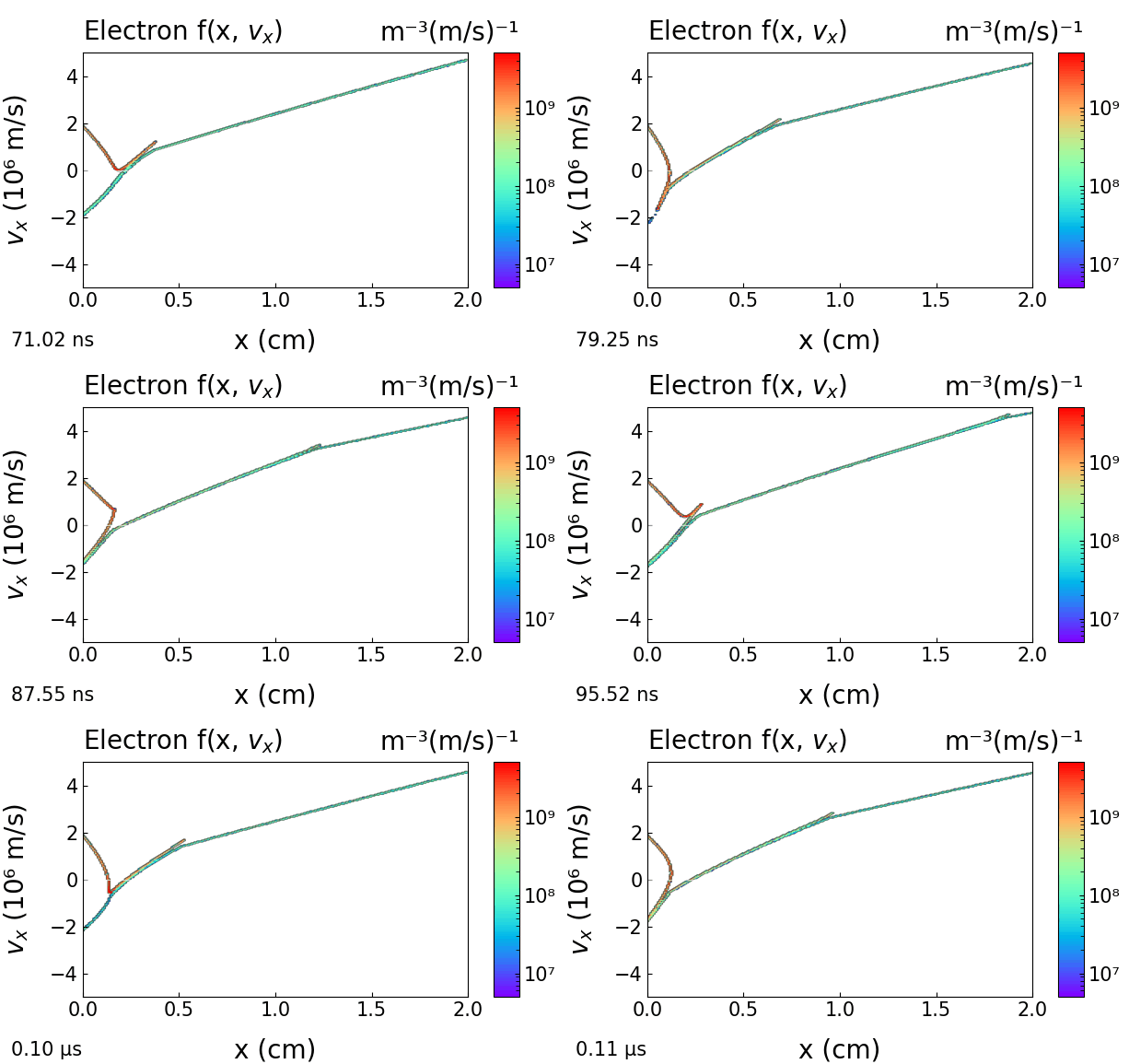
A beam above the space-charge limit traps and reflects electrons.
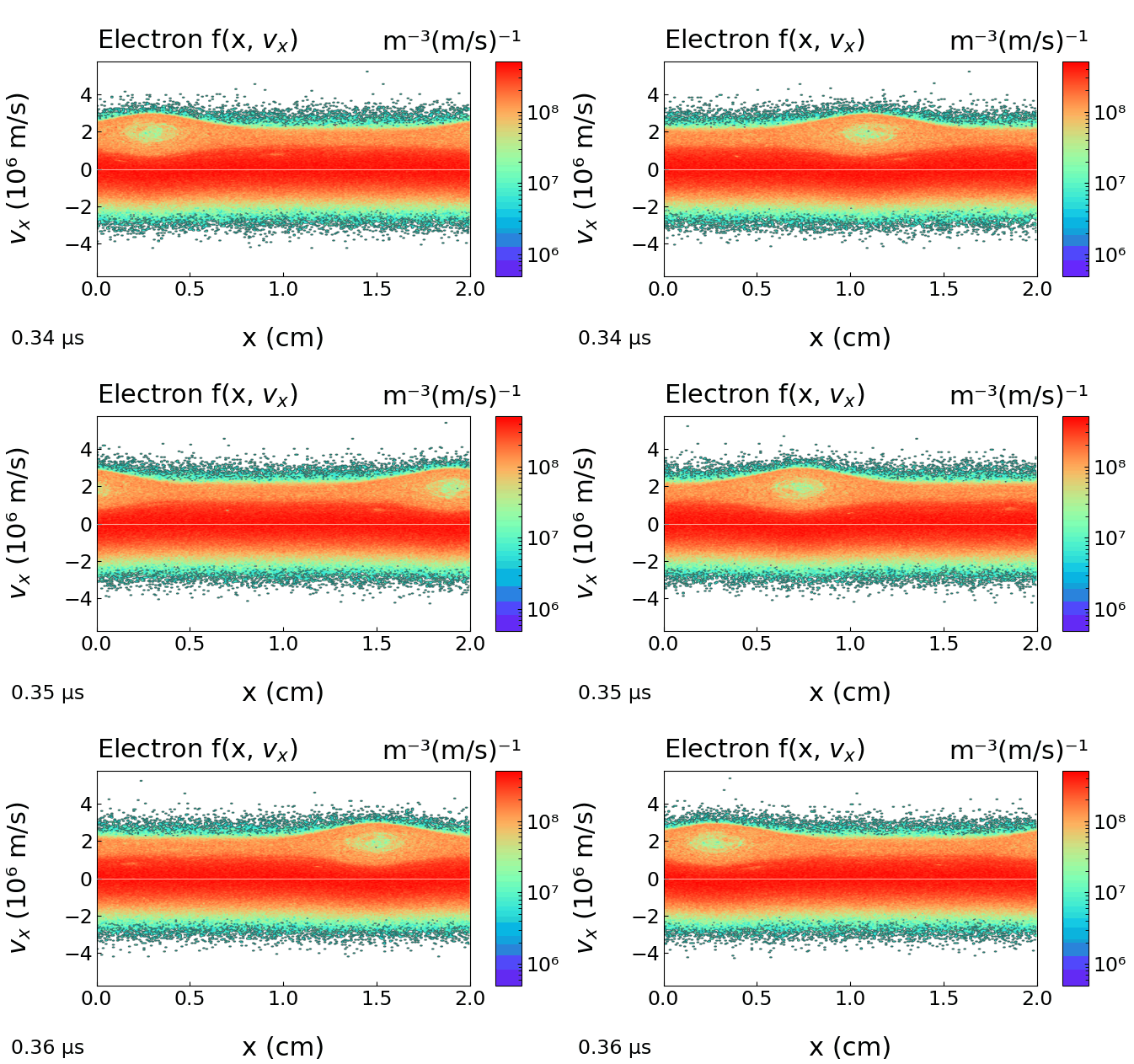
A dilute fast beam destabilizes against a dense background.
JC-PIC has the unusual characteristic of having been written almost entirely by an artificial intelligence — Anthropic's Claude — working under the scientific direction of the author.
The Fortran/OpenMP engine, the Python interface, the viewers, the case browser, the build pipeline and the user manual were produced from natural-language specifications. The human contribution focused on the physics requirements, the validation against benchmarks and the published literature, and the iterative refinement of the user experience.
The physics algorithms — the Boris pusher, the null-collision MCC scheme, the Poisson solvers, the secondary-emission model — were implemented correctly, close to their final form, on early attempts; development effort that would normally span many months was compressed into weeks. An account of this development method is given in the user manual.
The same approach was used by the author to build LibrAIry ↗, a desktop reference manager and private AI assistant for organizing and analyzing scientific PDFs.
Physics requirements and equations, choice of algorithms, validation against benchmarks and published results, design and curation of the case library, testing.
Essentially all of the Fortran engine and Python interface, the diagnostics and viewers, the documentation, the build and packaging pipeline.
A complete walkthrough — from loading a bundled case to running it and reading the diagnostics in the viewers.
A guided video walkthrough of the interface and viewers is being prepared and will be embedded here.
JC-PIC v1.0.2 is available for download. A single installer bundles the simulation engine, the graphical interface, the cross-section data files and the full test-case library. No administrator privileges needed.
The first time you run the installer, Windows very probably shows a full-screen blue panel headed “Windows protected your PC”, offering what looks like a single button: Don't run. Do not stop there — the link you need is small and easy to miss.
Why this happens, and why it is not an alarm. SmartScreen is not an antivirus and this is not a virus detection: it reports that the file has no download history yet. A program published by a single academic group starts with none, and each new version starts again from zero. The installer is also not code-signed at this stage, which is what would otherwise shorten the period during which the warning appears.
Download JC-PIC only from jc-pic.org. If you meet this blue panel after downloading from anywhere else, the right answer really is Don't run.
A possible alternative later — the Microsoft Store. Publishing through the Store would remove this screen altogether, since a Store app is vetted by Microsoft and updated by Windows itself. JC-PIC is not on the Store today and no date is promised; if that changes, this page will link to it. Until then, the three steps above are the way in.
The first start of JC-PIC asks for your name and e-mail address and sends them to a Google server, which replies with your activation key. In countries where Google services are blocked (mainland China, for example), this request cannot go through and the window shows “timed out”, whatever your connection. Your computer is fine, and JC-PIC itself never needs the Internet once activated.
You can still activate, in three steps (version 1.0.2 or later):
If you installed version 1.0 or 1.0.1, please install version 1.0.2 first: the activation window of the earlier versions cannot take a key without Internet.
New to JC-PIC? See the quick-start steps just below.
How to cite. Publications using JC-PIC should cite its companion book: J.-P. Boeuf, Physics of Low Temperature Plasmas via Particle Simulation — the JC-PIC test-case library, Zenodo (2026), doi:10.5281/zenodo.22258142 (CC BY 4.0). The software itself is free of charge under its own licence.
The installer is archived on Zenodo as doi:10.5281/zenodo.22284514 — this identifier always leads to the latest release. It identifies the software; the reference to cite is the book above.
Version history. One entry per version: does it change the results, does it change what you see, was any data at risk.
1.0.2 — 28 September 2026. Three corrections. (1) Activation without access to Google: the activation window now shows the machine ID of the computer, with a Copy button, and has a link “I already have a key”, so that a key sent by e-mail can be entered directly (see “Registration shows timed out” above). (2) Periodic cases: the time-averaged profiles (densities, powers, ionization rate) had wrong values, about half of the true ones, on the two end points of the domain. The instantaneous profiles were correct. (3) Electronegative gases (O2, SF6, CF4, Cl2, …): a warning now tells the user that attachment and negative ions are not yet treated in this version; results for these gases should not be used. Negative ions will be handled in a future version. Results: changed only in one case — the time-averaged profiles of periodic cases, on their two end points; everything else is identical to 1.0.1. Visible behaviour: changed — the activation window and the new warning. Your data: safe.
1.0.1 — 18 September 2026. Corrects one bug of version 1.0 in Files > Working Directory. When the selected folder already contained a JC-PIC calculation and the user answered “No” (keep the existing data), the working directory was not changed and no message was shown. Results: unchanged — the simulation engine, the numerical methods and the input files are identical to version 1.0, and a calculation gives exactly the same results. Visible behaviour: changed — this menu entry now works as described in the manual. Your data: safe, unless you answered “Yes” to that question: the folder was then erased, as the dialog announced. No other file was ever touched.
1.0 — 7 September 2026. First public release.
Older versions remain available on the GitHub releases page.
Four steps. The bundled case library is the recommended entry point — no blank configuration to fill in. You can read it online first to pick the case you want.
Run the installer, open JC-PIC, and choose a working folder where your runs will live. Each simulation is just a self-contained folder on your disk.
Open Input → Load Test Cases…, browse the library, and pick a case close to what you have in mind. JC-PIC copies it into your working folder.
Click Run to start from t = 0, or open the bundled snapshot for an instant quasi-steady view. Results are written to disk as it goes.
Open the live viewers — density profiles, phase space, EEPF, wall fluxes — then vary the pressure, voltage, frequency or field and see how the discharge responds.
A paused or stopped run can be resumed at any later time — even on another machine pointing to the same folder. The full procedure is covered in the user manual.
The code is maintained by one person. Two things help more than anything else: telling me when something breaks, and sending me the discharge you would like to see in the case library.
Anything that crashes, hangs, plots the wrong thing, or simply does not behave the way the manual says. Small oddities are worth reporting too — they are usually the visible end of something larger.
What helps me reproduce it:
input.nml (or the name of the bundled case)jcpic.log file from your working folderThe case library is meant to grow. If you have a discharge worth sharing — a configuration from your own work, a published result you have reproduced, or an example you use for teaching — send it and I will add it, with your name on it.
A complete contribution is:
input.nml, and a snapshot if the case is slow to convergeThe easiest way to prepare it: in JC-PIC, Input → Load Test Cases… → Add my case… turns your working folder into a case of your own, with a description you complete with Edit info; then send me that folder. Cases that are integrated into the library are published under your name, in the application, on this site and in the book.
Questions about the physics, the numerics or a result you do not understand are welcome at the same addresses.